Course Interview
Our course interviews take place once a month between November and April. We will email you a week before your interview with details on the date and time.

How do I join my Course Interview?
Your course interview will take place on Microsoft Teams. Ideally, we’d like you to join the interview meeting using a computer, tablet or smartphone with a webcam as this makes the interview a more personal experience.
The link to join your interview is available via your online Applicant Portal. You will also receive a reminder email a few days before your interview.
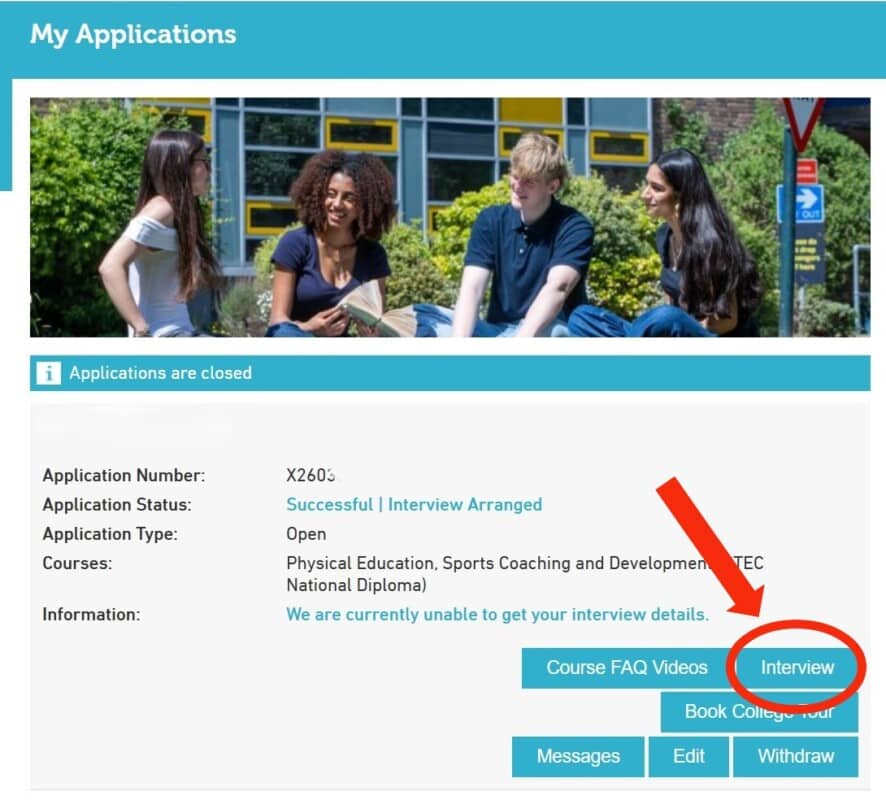
You can find more detailed instructions below on how to join using different devices. Please note, you do not need to sign in or create a Microsoft Teams account to join the meeting.
Please join the meeting a few minutes early so you have time to ensure everything is working satisfactorily before the interview starts.
If you need any additional help please email [email protected] or call 020 8335 2555
Joining using a PC or Mac laptop/desktop
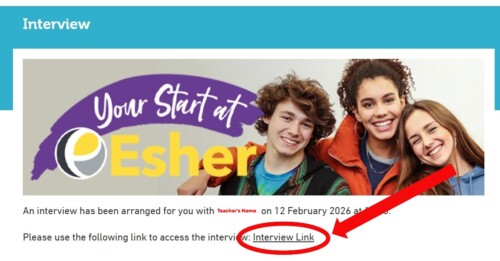
You don’t need to download or install any software. Simply click on the Interview Link to open up Microsoft Teams in your web browser.
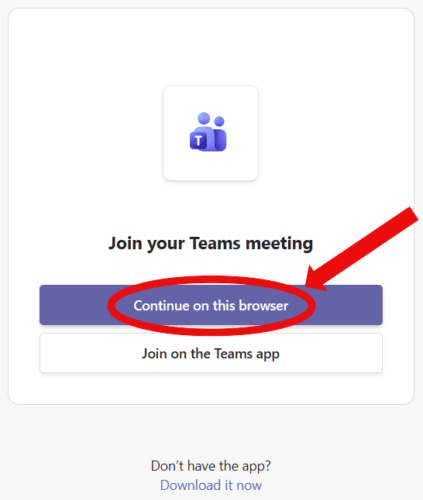
You will be presented with the option below. Click Continue on this browser.

 Follow the onscreen instructions. When you turn on your microphone and webcam your web browser will ask you if you want to allow teams.microsoft.com to use you microphone and camera. Click Allow

Joining using a smartphone or tablet
Please download the Microsoft Teams app from the Apple App Store or Google Play Store. The app is free to download.
Once you have downloaded the app, click on the Interview Link to join the meeting.
Please note, you do not need to sign in or create a Microsoft Teams account to join the meeting.